Markdown that reads like prose.
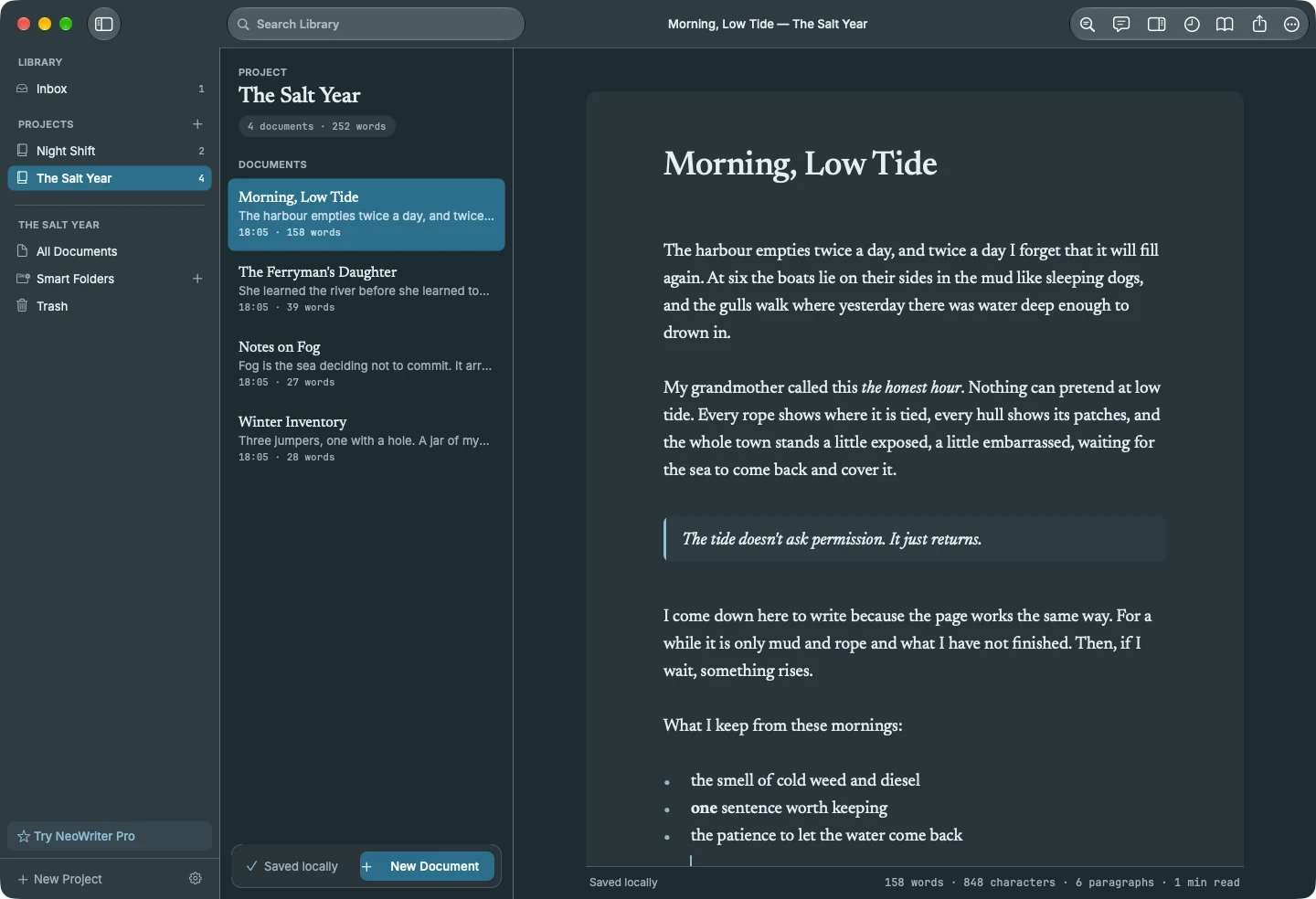
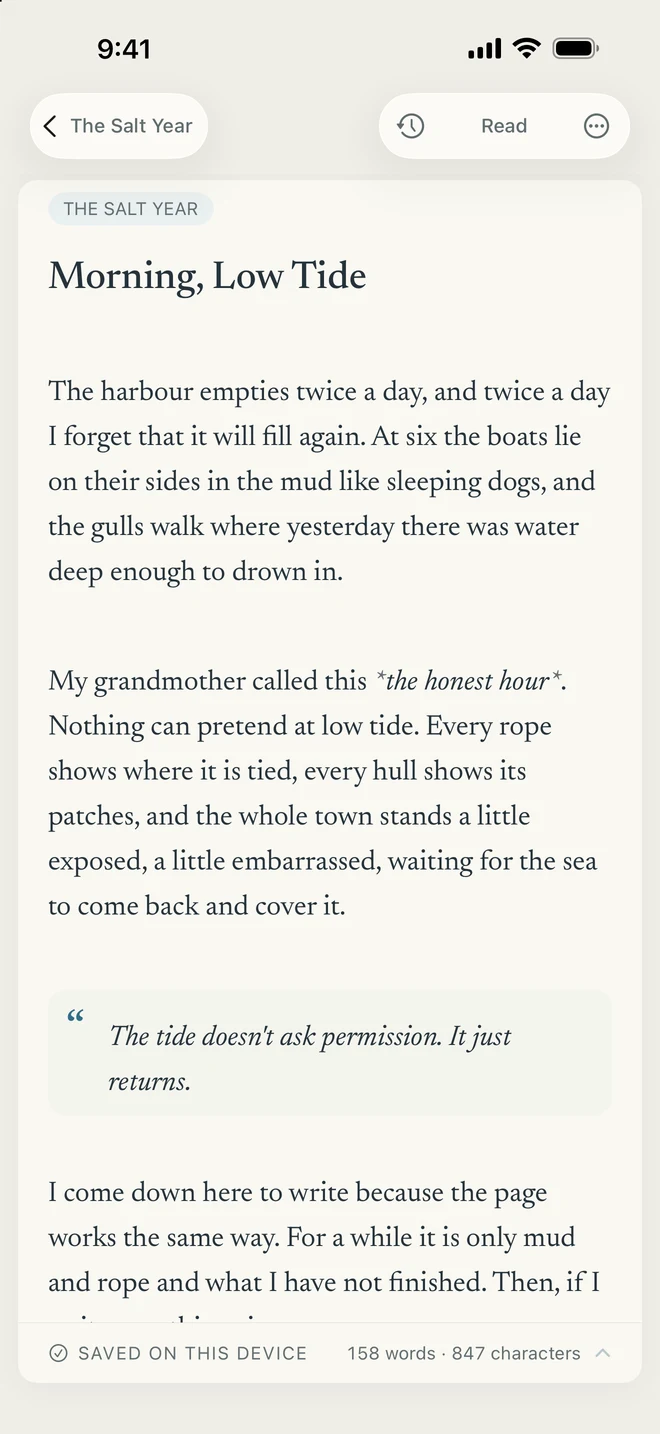
Formatting markers step out of the way as you leave a line and return when you edit it. Switch to Read when it is time to hear the rhythm of the whole piece.
YOUR WORDS ARE NOT DISPOSABLE.
A calm Markdown writing app for notes, journals, and longer drafts. Your writing saves on your device as you go, earlier versions stay within reach, and sync sends only encrypted copies to the cloud you choose.
iPhone & iPad Mac
01 / YOUR DRAFT COMES FIRST
An interruption. An accidental deletion. Two devices with different edits. NeoWriter is built around keeping the words, not making you start again.
Protection is a stack, not a single Save button: saving on your device as you write, a writing history you can return to, Trash, and sync that keeps both sides of a disagreement.
Know your recovery pathsYour writing saves on this device as you go. A network connection is not a prerequisite for keeping your work.
Writing history keeps earlier versions. Restoring one saves it as a new version, so the draft you had stays in history too.
Edits to different paragraphs simply merge. When two devices change the same lines, a conflict copy keeps the other side for you to review.
AI edits arrive as proposed changes you accept or reject one by one. Accepted changes are saved as their own version in history.
02 / LESS FRICTION. MORE FLOW.
Writing should feel immediate. Reading should keep its rhythm. Native editing on Mac, iPhone, and iPad, Markdown that reads like prose, and a quiet page put the experience ahead of the feature count.
60 / 120 HZ ENGINEERING TARGETS
Input, scrolling, selection, and reading belong in the foreground. Indexing, history, and sync work should not stand between you and the next line.
Engineering targets, not measured pass results. 120 Hz requires supported ProMotion hardware; actual performance varies with the system and the work on the page.
Formatting markers step out of the way as you leave a line and return when you edit it. Switch to Read when it is time to hear the rhythm of the whole piece.
Color themes, light and dark appearances, adjustable typography, and your own fonts. Focus mode keeps your eyes on the line you are writing.
Projects, folders, tags, and smart folders keep the work in order. Library search and an outline help you move through longer pieces.
Quick Capture in the menu bar takes a thought without leaving what you are doing, and New NeoWriter Note in the Services menu saves selected text from other apps.
Optional AI can rewrite, summarize, continue, or leave margin notes as a reader would. Use Apple's on-device model where available, or your own key with a supported provider.
Add images to your writing, then export Markdown or share a document. On Mac, export to PDF or print.
03 / PRIVATE COPIES, EVEN IN YOUR CLOUD
Sync is optional. When you turn it on, choose iCloud, Dropbox, OneDrive, or your own HTTPS WebDAV server. NeoWriter seals your writing history and images on your device before they are sent.
Your destination stores encrypted objects, not readable Markdown named after your chapters. NeoWriter does not run a server that keeps a copy of your library.
Understand the protectionWHEN SYNC IS ON
Encryption protects the content, not every detail: your provider can still see your account, object sizes, counts, and timing. Sync encryption does not encrypt the workspace files on your device; your device's own protection covers those.
Save it somewhere you can reach without this device. It lets another device open your encrypted writing. The developer cannot recover it for you.
An external AI provider needs readable text, so its requests are not covered by sync encryption. The app shows what will be sent, and to which provider, before you send it.
BEFORE YOU SETTLE IN
Writing comes first. It is built for notes, journals, essays, stories, and longer drafts, with projects and folders to keep the work organized. Plain text and Markdown remain at the center.
Yes. Your workspace is stored on your device, so writing does not depend on a connection. Sync and external AI need a connection when you choose to use them.
Keeping your words is the central design rule: saving on your device as you write, writing history, Trash, and conflict-preserving sync work together. Restoring an earlier version saves it as a new version, so the draft you had stays in history. This is layered protection, not a guarantee against every device failure or user action. Export copies of important writing as well.
Edits to different parts of a document merge on their own. When two devices change the same lines, NeoWriter keeps one side in the document and the other in a conflict copy next to it, so you can compare them and decide what to keep. You never have to read conflict markers.
No. These are engineering targets: a 16.67 ms frame budget for 60 Hz displays and an 8.33 ms budget for supported 120 Hz ProMotion displays. They are not published pass results for every device or document. Actual performance depends on hardware, system refresh-rate settings, document complexity, and the scenario; performance work and device measurements are ongoing.
With sync on, your writing history and images are encrypted on your device before they are sent, so the provider stores ciphertext. It can still see account and network information, object identifiers, sizes, and request timing. Exports and files you share yourself are not covered by sync encryption.
Your workspace on this device stays readable without it. The recovery key is what lets another device open your encrypted writing, and one key covers all the workspaces in your account. Keep it somewhere you can reach without this device. Replacing it does not revoke earlier keys, and the developer cannot recover it for you.
No. AI is optional. You can use Apple's on-device model where your device supports it, or your own API key with Anthropic, OpenAI, DeepSeek, OpenRouter, Grok, Google AI Studio, or a custom OpenAI-compatible endpoint. External requests go directly to that provider, not through a NeoWriter server; review the text and recipient before sending. Proposed edits are never applied until you accept them.
Writing, Markdown, projects and folders, writing history, Trash, export, and iCloud sync are free. Pro adds Dropbox, OneDrive, and WebDAV sync, more themes, papers, and fonts, AI assistance, and other extras. Pro is one purchase across iPhone, iPad, and Mac: monthly, yearly, or Lifetime. Every Apple ID can try Pro free for 14 days, and the trial never turns into a charge. Prices appear in the app before you buy.
NeoWriter for iPhone, iPad, and Mac is not yet on the App Store. Visit Support or contact Genjux for release information. This page does not offer a store purchase or promise a release date.
PROTECT THE DRAFT. ENJOY THE WRITING.
Your words deserve a thoughtful place to land.
Ask about NeoWriter, release information, or support.